


 By
By Meta AI Interactive Artifacts are AI-created pieces of content that users can generate, customize, and edit through conversations with Meta AI. Unlike traditional AI responses that only provide text, these artifacts are designed to become working content that can be refined, adjusted, and reused.
This feature is part of the wider Meta AI upgrade covered in our parent guide, Meta AI Mobile App Upgraded: New Features Unveiled, in which Meta is expanding its assistant capabilities beyond simple questions and answers.
What Are Meta AI Interactive Artifacts?
Meta AI Interactive Artifacts are editable, AI-generated creations that allow users to build content rather than just read a response. The idea is simple: you describe what you need, Meta AI creates a starting version, and you then improve it with additional instructions.
For example, a user can ask Meta AI to create a social media campaign plan, a study guide, a business proposal outline, or a content calendar. After the first version appears, the user can ask for changes such as making it shorter, adding examples, changing the style, or adapting it for a different audience.
The difference is the ability to continue working on the same creation.
A normal AI answer often ends after one response. Interactive Artifacts are designed to be an ongoing workspace where ideas can be developed.
How Meta AI Interactive Artifacts Work
The process begins with a prompt. Meta AI analyzes your request and creates content based on the details you provide.
A simple prompt might create a basic result, while a detailed prompt can produce something much more useful.
For example:
“Create a marketing plan.”
This gives limited information.
A stronger request would be:
“Create a 30-day marketing plan for a small online clothing brand targeting customers in the United States. Include social media ideas, customer engagement strategies, and content themes.”
The second prompt provides Meta AI with context on the goal, audience, and expected format.
After generating the artifact, users can continue editing it through follow-up instructions. You can request changes without rebuilding everything from the beginning.
When working with AI tools, this editing process is often where the biggest productivity gains happen. The first output gives you a foundation, but the ability to improve it quickly saves time.
How to Use Meta AI Artifacts: Step-by-Step Guide
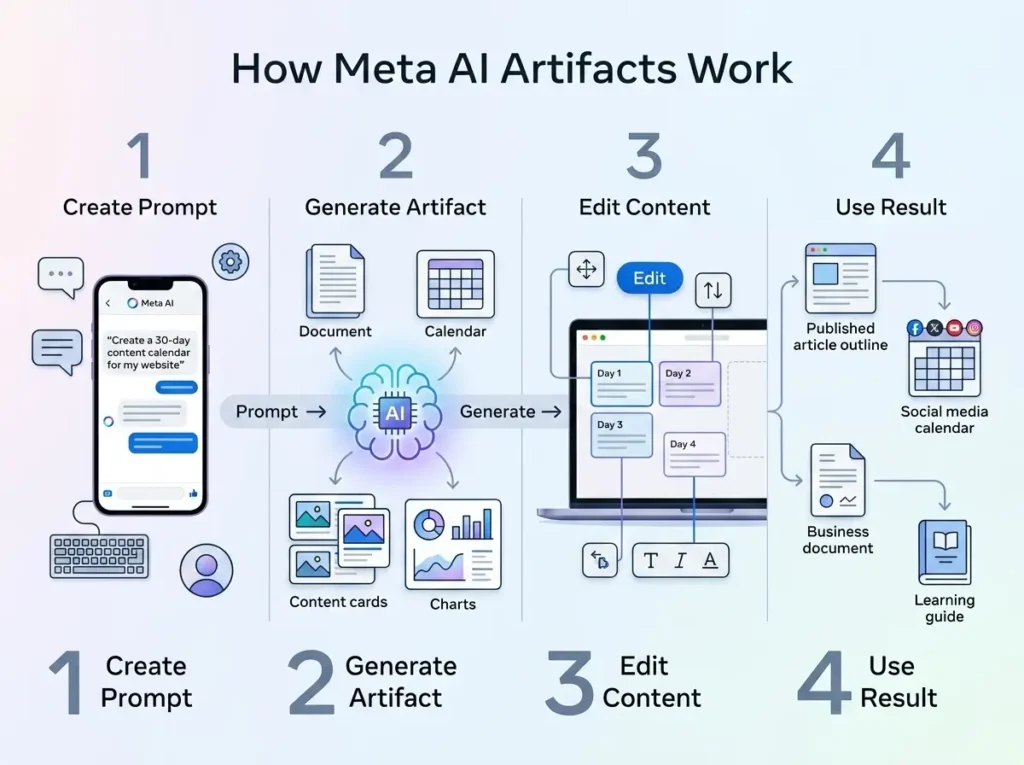
Using Meta AI artifacts does not require advanced technical skills. The main challenge is knowing how to communicate your idea clearly.
Start by opening Meta AI on a supported platform and describing what you want to create. Don’t ask for a general answer; explain that you want a structured or editable creation.
For example:
“Create an interactive content calendar for my technology website.”
After Meta AI generates the result, review it carefully. If something does not match your needs, continue the conversation.
You can ask:
“Make this suitable for beginners.”
“Add more examples.”
“Change the tone to professional.”
“Turn this into a detailed article outline.”
The more specific your instructions are, the closer the final result will be to your expectations.
A useful approach is to think about Meta AI like a creative assistant. Give it direction, review the output, and improve it step by step.
Meta AI Workspace Feature Explained
The Meta AI workspace feature focuses on turning AI from a question-answer system into a creation environment.
Instead of creating content in one step and moving it elsewhere for editing, users can develop ideas directly within the AI experience and schedule their workspace.
For content creators, this can make tasks like planning articles, organizing video ideas, and preparing social media campaigns easier. For example, a blogger could generate a content structure and then ask Meta AI to adjust the headings, improve readability, or tailor it to a specific audience.
Small businesses can also benefit from this approach. A business owner could create customer guides, promotional ideas, or basic marketing materials without needing multiple tools.
The workspace concept is mainly about reducing the gap between having an idea and turning that idea into usable content.
Meta AI Interactive Content Creation Examples
Meta AI Interactive Content Creation can be useful across different areas because the output can be adapted based on the user’s needs
A website owner might use it to create article outlines, FAQ sections, or content planning documents.
A social media creator could use it for:
- Campaign planning
- Video concepts
- Caption ideas
- Brand content organization
A student could create learning materials, revision notes, or project structures.
A business team could use it for preparing internal documents, customer resources, or early drafts of marketing campaigns.
The important part is that these creations are not meant to replace human decisions. They provide a faster starting point that users can shape according to their goals.
How to Get Better Results From Meta AI Artifacts
The quality of an artifact depends heavily on the prompt.
Many users get disappointing results because they provide very little information and expect the AI to understand the complete goal.
A strong prompt usually explains the purpose, audience, preferred style, and important details.
For example:
“Create a beginner-friendly guide about personal finance for young adults. Use simple language, include examples, and organize it into clear sections.”
This gives Meta AI a clear direction.
Another useful method is improving the output through multiple rounds. Instead of trying to create the perfect result in one request, generate a draft and then refine it.
This workflow is similar to working with a human editor. The first version is the starting point.
Meta AI Artifacts Tutorial: Common Issues and Fixes
Why can’t I access Meta AI Interactive Artifacts?
Some users may not see the feature immediately because Meta releases new AI tools gradually. Availability can depend on location, account access, app version, or testing phases.
Updating the Meta AI app and checking again later may help if the feature is unavailable.
Can I edit Meta AI artifacts after they are created?
Yes. Editing is one of the main purposes of Interactive Artifacts. Users can continue giving instructions to modify the content, improve sections, or change the format.
Why is Meta AI creating poor-quality results?
The most common reason is unclear instructions.
If the output is too general, add more details about your target audience, preferred style, and the final purpose of the content.
For example, instead of saying “create a blog plan,” explain what type of blog you run, who your readers are, and what topics you want to cover.
Meta AI Interactive Artifacts Limitations
Although Interactive Artifacts speed up content creation, users still need to review the final result.
AI-generated content may require corrections, personalization, or additional research depending on how it will be used.
For casual projects, AI assistance can save significant time. For professional content, human editing remains an important step.
The best results come from combining AI speed with human creativity and judgment.
Meta AI Interactive Artifacts represent a move toward more practical AI assistance, where users can create, edit, and improve content through simple conversations. Whether you are a creator, student, or business owner, learning how to write better prompts and refine AI outputs can help you get much more value from this feature. Start experimenting with different ideas and explore how Meta AI can help turn your concepts into usable interactive content.